The much awaited 2nd part of the "Validating content on save" series is now online, thanks to Robert Curlette for taking over this epic effort.
Showing posts with label anguilla. Show all posts
Showing posts with label anguilla. Show all posts
Monday, October 15, 2012
Tuesday, July 17, 2012
Validating content on Save - Part 1 of many
Recently I had to do a project where we are validating quite some content options whenever the editors decide their work is done. This got me thinking about sharing some of these experiences. This post is the first of a few that I have lined up on this subject, and where I try to cover the available options for content validation from the simple (and cheap) ones to the very complex and over-engineered.
For (many) years, the solution to the eternal "how do I validate content" question with Tridion has been a combination of making fields mandatory and using the Event System (OnComponentSavePre anyone?).
Recently I had to take a different approach to this, since Tridion 2011 brings all this amazing extensibility framework (codenamed Anguilla) that allows to do whatever we want with our content, right? While this is true, the correct answer comes in many shades of gray, and the biggest obstacle on creating a great solution for validating content for your editors is the learning curve.
 Let’s think about how we can do this, by taking a very simple example, then growing it out to bigger things. In the first scenario we're covering in this series of posts, we will focus on how to validate that a field named "Title" starts with a capital letter, and we'll do this using 3 different approaches:
This will now force our field to start with an upper case letter, and Tridion will enforce the rule.
If I now try to save my content, Tridion will let me know I don’t understand what I’m doing:
 And since I won’t understand the error message either, this becomes more complex than what we can handle with simple schema restrictions…
There are other simple scenarios, particularly with number fields, that Tridion handles quite gracefully (by not allowing the editor to type a number higher than specified in "xsd:maxInclusive" for instance), or limiting the maximum number of characters you can type in a field. However, fairly quickly we fall into a domain where business logic is required to validate fields (common examples are Start and End Dates for events, where you depend on 2 fields to provide the correct validation).
So this was the "cheap" content validation: schema restrictions.
Let’s go now to the 2nd option, using the Event System.
Taking the same example from above (first character must be upper case) we could take one of 2 approaches: Let the user know that the first letter must be upper case, or automatically changing it. Which approach you take depends on your organization’s culture. In some companies it is OK to have the system take decisions for you, while other organizations need to give the editorial team full control about any content that gets created. Let's build an event system to deal with the second approach (letting the editors know about the errors of their ways):
Step 1: create an Event Class Library with Visual Studio.

Add some references from [Tridion-Home]\bin\client

Then let’s write some code to validate if your first character is upper case, and notify the editor if that’s not the case.
Restart Tridion (COM+ and Service Host) and let’s see what it does.

So, it’s a nice improvement from the previous message. Cost of development? Well, it took me about 20 minutes to write it and deploy it (fair enough, it’s far from ready, with things that you shouldn’t see in production like "if (component.Schema.Title != "Article") return;"), but you get the picture.
You could also just be slightly smart about it and outline this requirement in the field’s description:
 But this is too specific to this use case, and it’s a simple one after all.
Next (within a few days, I promise) we will start looking at how we could do this with Anguilla.
For (many) years, the solution to the eternal "how do I validate content" question with Tridion has been a combination of making fields mandatory and using the Event System (OnComponentSavePre anyone?).
Recently I had to take a different approach to this, since Tridion 2011 brings all this amazing extensibility framework (codenamed Anguilla) that allows to do whatever we want with our content, right? While this is true, the correct answer comes in many shades of gray, and the biggest obstacle on creating a great solution for validating content for your editors is the learning curve.
- Schema restrictions
- Event System
- CME Command Extension
<xsd:element maxoccurs="1" minoccurs="1" name="Title">
    <xsd:annotation>
        <xsd:appinfo>
            <tcm:extensionxml xmlns:tcm="http://www.tridion.com/ContentManager/5.0"></tcm:extensionxml>
        </xsd:appinfo>
    </xsd:annotation>
    <xsd:simpletype>
        <xsd:restriction base="xsd:string">
            <xsd:pattern value="[A-Z][A-Za-z0-9_ ]*"></xsd:pattern>
        </xsd:restriction>
    </xsd:simpletype>
</xsd:element>
This will now force our field to start with an upper case letter, and Tridion will enforce the rule.
If I now try to save my content, Tridion will let me know I don’t understand what I’m doing:

There are other simple scenarios, particularly with number fields, that Tridion handles quite gracefully (by not allowing the editor to type a number higher than specified in "xsd:maxInclusive" for instance), or limiting the maximum number of characters you can type in a field. However, fairly quickly we fall into a domain where business logic is required to validate fields (common examples are Start and End Dates for events, where you depend on 2 fields to provide the correct validation).
So this was the "cheap" content validation: schema restrictions.
Let’s go now to the 2nd option, using the Event System.
Taking the same example from above (first character must be upper case) we could take one of 2 approaches: Let the user know that the first letter must be upper case, or automatically changing it. Which approach you take depends on your organization’s culture. In some companies it is OK to have the system take decisions for you, while other organizations need to give the editorial team full control about any content that gets created. Let's build an event system to deal with the second approach (letting the editors know about the errors of their ways):
Step 1: create an Event Class Library with Visual Studio.

Add some references from [Tridion-Home]\bin\client

Then let’s write some code to validate if your first character is upper case, and notify the editor if that’s not the case.
using System;
using System.Collections.Generic;
using Tridion.ContentManager.ContentManagement;
using Tridion.ContentManager.ContentManagement.Fields;
using Tridion.ContentManager.Extensibility;
using Tridion.ContentManager.Extensibility.Events;

namespace ValidateTitleFieldUpperCaseFirstLetter
{
    [TcmExtension("ValidateTitleFieldUpperCaseFirstLetter")]
    public class Validate : TcmExtension, IDisposable
    {
        private readonly List<EventSubscription> _subscriptions = new List<Eventsubscription>();

        public Validate()
        {
            Subscribe();
        }

        private void Subscribe()
        {
            EventSubscription subscription =
                EventSystem.Subscribe<Component, SaveEventArgs>(ValidateFirstLetterIsUpperCase, EventPhases.Initiated);
            _subscriptions.Add(subscription);
        }

        private void ValidateFirstLetterIsUpperCase(Component component, SaveEventArgs args, EventPhases phases)
        {
            if (component.Schema.Title != "Article") return;
            if (component.ComponentType != ComponentType.Normal) return;
            ItemFields fields = new ItemFields(component.Content, component.Schema);
            SingleLineTextField titleField = (SingleLineTextField)fields["Title"];
            if(titleField.Values.Count == 0)
            {
                // Tridion should take care of this, but just in case someone changed the field to optional
                throw new Exception("Title field is mandatory.");
            }
            string fieldContent = titleField.Value;
            if(char.IsLower(fieldContent[0]))
            {
                throw new Exception("The first letter of the Title field must be a Capital letter.");
            }
        }

        public void Dispose()
        {
            foreach (EventSubscription subscription in _subscriptions)
            {
                subscription.Unsubscribe();
            }
        }
    }
}
Now let’s build our code and tell Tridion to execute it (add a line similar to this to Tridion.ContentManager.Config under "<extensions>"<add assemblyFileName="D:\Tridion 2011\PathToYourDll\ValidateTitleFieldUpperCaseFirstLetter.dll" />
Restart Tridion (COM+ and Service Host) and let’s see what it does.

So, it’s a nice improvement from the previous message. Cost of development? Well, it took me about 20 minutes to write it and deploy it (fair enough, it’s far from ready, with things that you shouldn’t see in production like "if (component.Schema.Title != "Article") return;"), but you get the picture.
You could also just be slightly smart about it and outline this requirement in the field’s description:

Next (within a few days, I promise) we will start looking at how we could do this with Anguilla.

 Labels:
anguilla,
c#,
content validation,
event system,
projects,
schemas,
tom.net,
tridion,
tridion 2011,
tridion cme,
xml
9
comments
Labels:
anguilla,
c#,
content validation,
event system,
projects,
schemas,
tom.net,
tridion,
tridion 2011,
tridion cme,
xml
9
comments
Tuesday, June 05, 2012
The surprising difference of a good interface
Something happened to me in the past few days that got me thinking about User Interfaces and how important they really are.
 Last week was my birthday (thank you) and one of the most surprising gifts I received was a Logitech Driving Force GT Steering Wheel (as pictured above). I found it quite amusing, but frankly assumed it would be condemned to stay hidden away somewhere in my apartment: the last time I had played GT 5 was over a year ago, and though I think the game is brilliantly done, I had lost appetite for it.
Nevertheless, I decided I had to try this new way to play the game, with a more realistic interface.
And it's been... quite... amazing!
I just can't believe how much more real the game feels, how much the feedback received on the wheel changes the whole experience, how much more fun - and even scary - the same game feels. The exact same game that had been abandoned when I was just level 15. Since Friday night I made it to level 25. In other words, I spent about the same time playing since last Friday than I had in the previous ~1.5 years since I bought the game.
I tend to think I'm a person that looks at engineering for engineering's sake, and discard presentation tricks, and tend to think of the beauty of a system by its inner workings, not by how it is presented. But here is proof to the contrary: I got instantly re-addicted to a game I had discarded. Granted, I kept respect for the game, it is brilliantly executed - but never assumed that a better interface would get me so much back into it.
Being who I am, of course I started doing analogies to our latest UI update, the product formerly known as SiteEdit. In the end, the UI update is nothing more than a Steering Wheel. The core product has not changed, you still have to do the exact same tasks, in the exact same order. A Component Presentation still has a Component and a Component Template. An image still is a multimedia component. A Page is still a collection of Component Presentations with a Page Template. But something about it makes me install it on every server I install - including my playground servers - simply because it is fun.
Some months ago I had to do an impromptu demo to a customer, and started by apologizing for the inevitable errors that a test environment will always contain. It is after all my testing playground and it is supposed to be broken. 10 minutes into the demo, the customer asked to see SiteEdit - and I replied that I wouldn't have SiteEdit on my test server - it's a test server, not something I'd use for content creation!
Less than a year later, my servers are still my testing playground, they're still utterly broken in many ways that make then unsuitable for demos. But the new shiny Tridion UI is there. And I still don't use those servers to create content.
So, what changed?
Just like adding a Steering wheel to my GT 5 experience, Tridion UI just makes it more fun, as if you're somehow more connected to the system, experiencing a more natural way to interact with it.
Here's looking forward to more features being added to what is simply put a brilliant interface! (I mean the UI, not the steering wheel)

Nevertheless, I decided I had to try this new way to play the game, with a more realistic interface.
And it's been... quite... amazing!
I just can't believe how much more real the game feels, how much the feedback received on the wheel changes the whole experience, how much more fun - and even scary - the same game feels. The exact same game that had been abandoned when I was just level 15. Since Friday night I made it to level 25. In other words, I spent about the same time playing since last Friday than I had in the previous ~1.5 years since I bought the game.
I tend to think I'm a person that looks at engineering for engineering's sake, and discard presentation tricks, and tend to think of the beauty of a system by its inner workings, not by how it is presented. But here is proof to the contrary: I got instantly re-addicted to a game I had discarded. Granted, I kept respect for the game, it is brilliantly executed - but never assumed that a better interface would get me so much back into it.
Being who I am, of course I started doing analogies to our latest UI update, the product formerly known as SiteEdit. In the end, the UI update is nothing more than a Steering Wheel. The core product has not changed, you still have to do the exact same tasks, in the exact same order. A Component Presentation still has a Component and a Component Template. An image still is a multimedia component. A Page is still a collection of Component Presentations with a Page Template. But something about it makes me install it on every server I install - including my playground servers - simply because it is fun.
Some months ago I had to do an impromptu demo to a customer, and started by apologizing for the inevitable errors that a test environment will always contain. It is after all my testing playground and it is supposed to be broken. 10 minutes into the demo, the customer asked to see SiteEdit - and I replied that I wouldn't have SiteEdit on my test server - it's a test server, not something I'd use for content creation!
Less than a year later, my servers are still my testing playground, they're still utterly broken in many ways that make then unsuitable for demos. But the new shiny Tridion UI is there. And I still don't use those servers to create content.
So, what changed?
Just like adding a Steering wheel to my GT 5 experience, Tridion UI just makes it more fun, as if you're somehow more connected to the system, experiencing a more natural way to interact with it.
Here's looking forward to more features being added to what is simply put a brilliant interface! (I mean the UI, not the steering wheel)
Saturday, February 11, 2012
SweetEdit
I've spent the last week in SDL's office in Amsterdam with some of the Tridion masters (including Alvin Reyes and Mihai Cadariu) for some knowledge transfer from R&D regarding our soon-to-be-launched re-vamped, re-thought, re-designed and re-super-improved SiteEdit 2012.
As typically happens in this type of Knowledge Transfer, the information flow always goes both ways - we learn from R&D on what the tool is expected to do while showing back to R&D how we expect it to behave under the blueprint abuse that we constantly put Tridion through.
And while it was clear that the tool is still in development (a couple of buttons were not enabled yet on the build we used) it was also clear that what is in place really works amazingly well.
I really don't even know where to start when it comes to SiteEdit, there's just so much being added and/or modified that it's hard to start.
So I'll start with the simple improvements I've seen.


Absolutely amazing and surprisingly stable and fast. Can't wait for it to come out.
As typically happens in this type of Knowledge Transfer, the information flow always goes both ways - we learn from R&D on what the tool is expected to do while showing back to R&D how we expect it to behave under the blueprint abuse that we constantly put Tridion through.
And while it was clear that the tool is still in development (a couple of buttons were not enabled yet on the build we used) it was also clear that what is in place really works amazingly well.
I really don't even know where to start when it comes to SiteEdit, there's just so much being added and/or modified that it's hard to start.
So I'll start with the simple improvements I've seen.
- Defining Page Types (a prototype from which you can create a new page) is as simple as checking a box on _any_ existing page.
- Adding an image to Tridion's "content library" is as simple as dragging & dropping it into your existing library
- SessionPreview architecture shows changes to pages dynamically without the need to republish the page or any of component presentations (and avoiding any publishing queue bottleneck).
- The whole wording of this interface is much user-friendlier than Tridion's language in general, which tends to be very technical - Content instead of Components, "Edit everywhere" instead of "Edit parent"
- Ability to associate component templates with page templates - so that users will only see the options that make sense to use in any given page - and present these to the user as "Content Types"
Editing a "shared" component:

Selecting a page type for a new page:

Editing Content:

Selecting an image from the library:
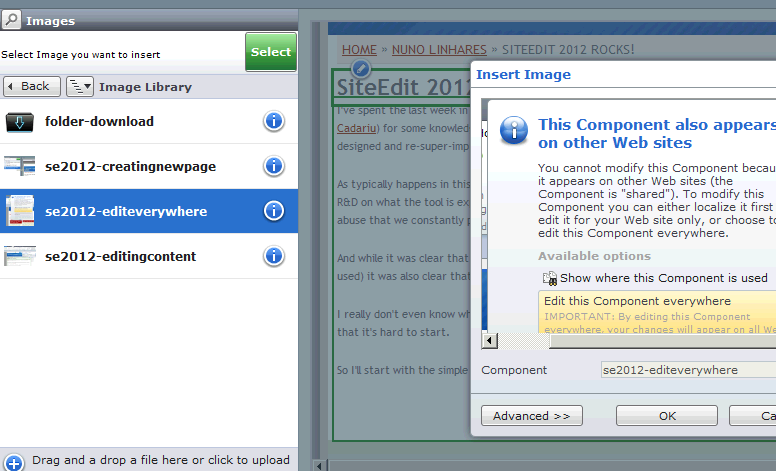
Absolutely amazing and surprisingly stable and fast. Can't wait for it to come out.
Wednesday, October 19, 2011
You think you got what it takes?
My evolution in Tridion knowledge is a repeating (and repeatable) pattern:
So why would it be any different with the new Anguilla Framework introduced in 2011?
I think I'm on the transition between steps 3 and 4, where I do get things to work but in many cases I am not really sure why. It has first and foremost to do with my lack of knowledge and any practical experience on _proper_ JavaScript development. Heck, other than simple carousels and show/hide stuff I don't think I had ever written more than 10 lines of JavaScript in one go.
Here's a few tips on some of the things I've done so far too keep me somewhat sane, I hope this will help others:
DISABLE CACHE ON YOUR BROWSER. Seriously, get the Firefox Web Developer extension, and turn the cache off while developing.
Get used to a javascript console. I use Firebug mostly, and the messages it logs are priceless! Some people prefer Chrome, others IE. I don't really care. Just use one.
Backtrack what the CME is doing when it fails. When your extension breaks Tridion completely (believe me, it will happen a LOT of times) Tridion will gracefully half-load and not show you any error. Luckily you had your Javascript console when the CME was loading, and you can clearly see what request broke it. Copy the url that it tried to load (it will look more or less like this: http://localhost/WebUI/Editors/CME/Views/Dashboard/Dashboard_v6.0.0.39607.6_.aspx?mode=js) and now you'll probably get a very useful ASP.NET error message instead (typically along the lines of "File X does not exist") which will point you in the right direction.
And, most important, keep believing you CAN do it. You'll get there.
- Looks cool, and pretty easy
- God what the hell is that?
- I hate you Tridion
- Why on earth is it working now?
- Hmm. That actually makes perfect sense
- WOW, look at all the shiny stuff I can do. Seriously, this is sooo coool!
- It was like this with Infrastructure knowledge and deployer configuration and broker xml files and Tomcat and IIS 6.5 years ago.
- It was like this with VBScript and Component Templates and XSLT and Metadata and Dynamic XSLT templates 6 years ago.
- It was like this with c# and Event Systems with Interops and marshalling and unmarshalling of COM and multithreading TDSE objects 5.5 years ago (hey Robert, remember this one?)
- It was like this with Compound Templating when it came out in February 2008.
- It was like this with complex Taxonomies when it came out in mid 2009.
So why would it be any different with the new Anguilla Framework introduced in 2011?
I think I'm on the transition between steps 3 and 4, where I do get things to work but in many cases I am not really sure why. It has first and foremost to do with my lack of knowledge and any practical experience on _proper_ JavaScript development. Heck, other than simple carousels and show/hide stuff I don't think I had ever written more than 10 lines of JavaScript in one go.
Here's a few tips on some of the things I've done so far too keep me somewhat sane, I hope this will help others:
DISABLE CACHE ON YOUR BROWSER. Seriously, get the Firefox Web Developer extension, and turn the cache off while developing.
Get used to a javascript console. I use Firebug mostly, and the messages it logs are priceless! Some people prefer Chrome, others IE. I don't really care. Just use one.
Backtrack what the CME is doing when it fails. When your extension breaks Tridion completely (believe me, it will happen a LOT of times) Tridion will gracefully half-load and not show you any error. Luckily you had your Javascript console when the CME was loading, and you can clearly see what request broke it. Copy the url that it tried to load (it will look more or less like this: http://localhost/WebUI/Editors/CME/Views/Dashboard/Dashboard_v6.0.0.39607.6_.aspx?mode=js) and now you'll probably get a very useful ASP.NET error message instead (typically along the lines of "File X does not exist") which will point you in the right direction.
And, most important, keep believing you CAN do it. You'll get there.
Sunday, October 16, 2011
PowerTools 2011
After some hard work from (mostly) Peter Kjaer, Chris Summers and Yoav Niran, the Power Tools project is finally under way.
As from yesterday, there is a guide outlining the steps required to create a power tool, so I thought it is about time to start recruiting more cooperation from the community.
The previous Tridion PowerTools were mostly a collection of ASP pages with some VBScript and Javascript helpers that provided a series of common functionalities:
Though some of the common functionalities are still "undeveloped", there is enough in place to start playing. We do have now a common progress bar (pretty impressive btw), a nice and mostly clean WebService-based framework, a common set of javascript tools to handle the webservice responses, etc.
The main missing point right now is an Item Picker, but there is some work happening on that one too.
As it is clear if you read the No-nonsense guide to creating a Power Tool, there's a whole bunch of files to create per PowerTool, and each file has a very specific - and required - purpose. As the platform evolves we will be merging more and more of these features into a Common library, but for now you have to live with it...
If you want to collaborate in this project - as we all hope you do - here's some of the things you may want to do:
As from yesterday, there is a guide outlining the steps required to create a power tool, so I thought it is about time to start recruiting more cooperation from the community.
The previous Tridion PowerTools were mostly a collection of ASP pages with some VBScript and Javascript helpers that provided a series of common functionalities:
- Progress bars for long-running processes
- Logging and debugging information
- Item Pickers
Though some of the common functionalities are still "undeveloped", there is enough in place to start playing. We do have now a common progress bar (pretty impressive btw), a nice and mostly clean WebService-based framework, a common set of javascript tools to handle the webservice responses, etc.
The main missing point right now is an Item Picker, but there is some work happening on that one too.
As it is clear if you read the No-nonsense guide to creating a Power Tool, there's a whole bunch of files to create per PowerTool, and each file has a very specific - and required - purpose. As the platform evolves we will be merging more and more of these features into a Common library, but for now you have to live with it...
If you want to collaborate in this project - as we all hope you do - here's some of the things you may want to do:
- Join the powertools discussion
- Join the IRC channel (yes! IRC! like in 1988) on freenode/#tridion
- Design the behavior of the next powertools. As it is now, this project is full of development geeks, but severely lacking on usability experts or actual powertool users. We could certainly use some help from a Functional point of view
- If you're dev-inclined, try out the guide mentioned above, and start playing with it. You may also want to write a better version of it, which we would ALL appreciate.
- Finally - determining icon sets for the tools would be a great contribution too.
Subscribe to:
Posts (Atom)